work/README.md

How I solve problems.

Eight real problems from shipped games, open-source work and prototypes. Each one: the problem, the approach, how it works, and what I built.

01-dressing-system.md
SOLAR · Game systems

A dressing system that survives every content drop

Owned end-to-end · 8 authoring tools
The dressing system in the published app.
Problem
Players build an avatar from garments they buy in an in-game shop with coins. The same clothes render on the player and on the NPC crowd, the catalogue grows with every content drop, and the people adding outfits aren't programmers.
Approach
Describe garments as data in a node graph instead of assembling them by hand, and give the team purpose-built authoring tools instead of the Inspector.
How it works
A garment graph describes each outfit's parts, slots and palettes. The shop asks the API for the items you can buy, and the ones you already own, with their prices; buying one is a request to the API. Assets load through Addressables, so only what's worn stays in memory, and the same data feeds the GPU-rendered crowd.
  • Node-graph data model
  • Custom editor tooling
  • Addressables
  • Coin shop + API
  • ScriptableObjects
02-npc-crowd-gpu.md
SOLAR · Performance

Filling a mobile city with NPCs without killing the frame

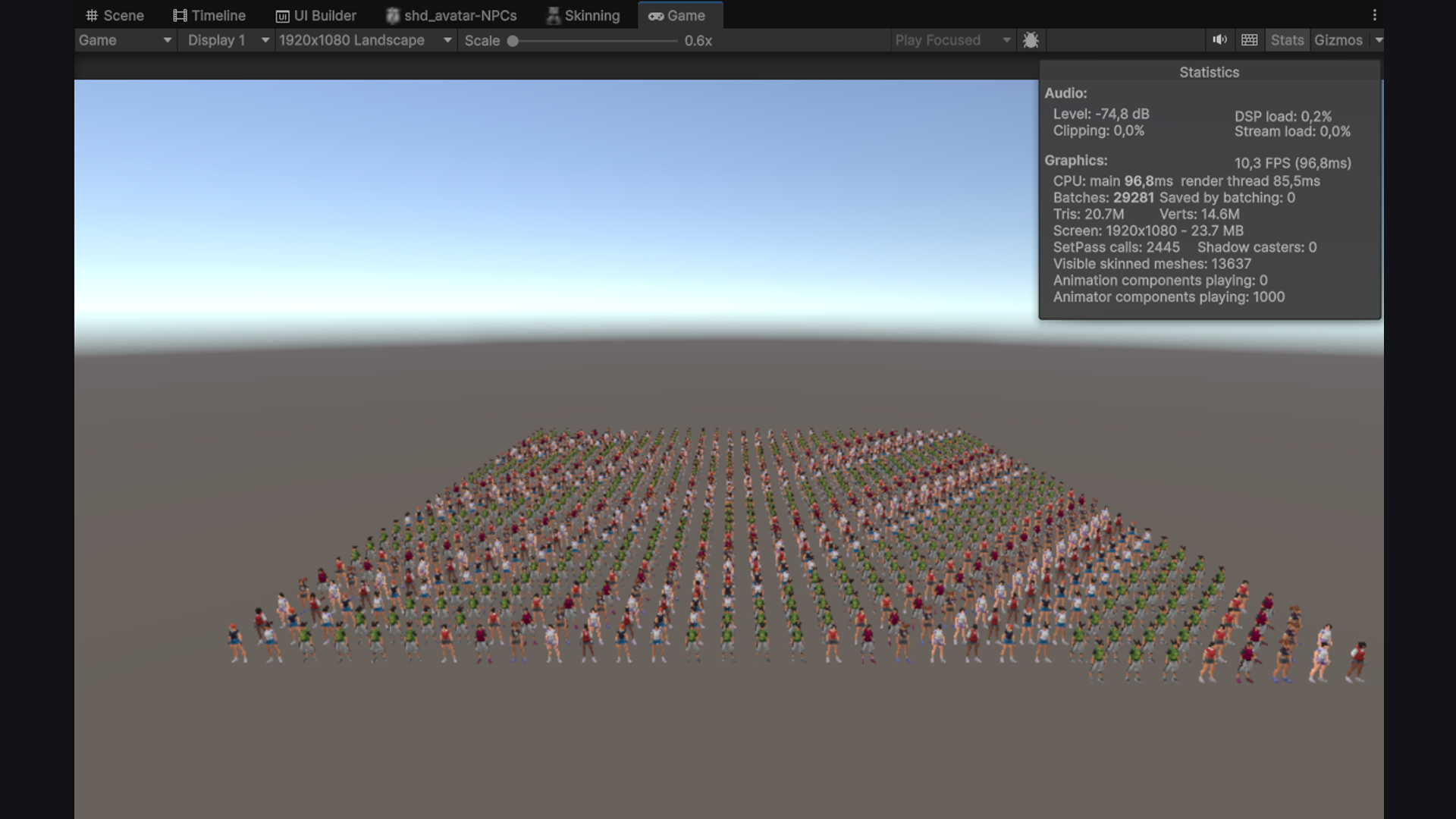
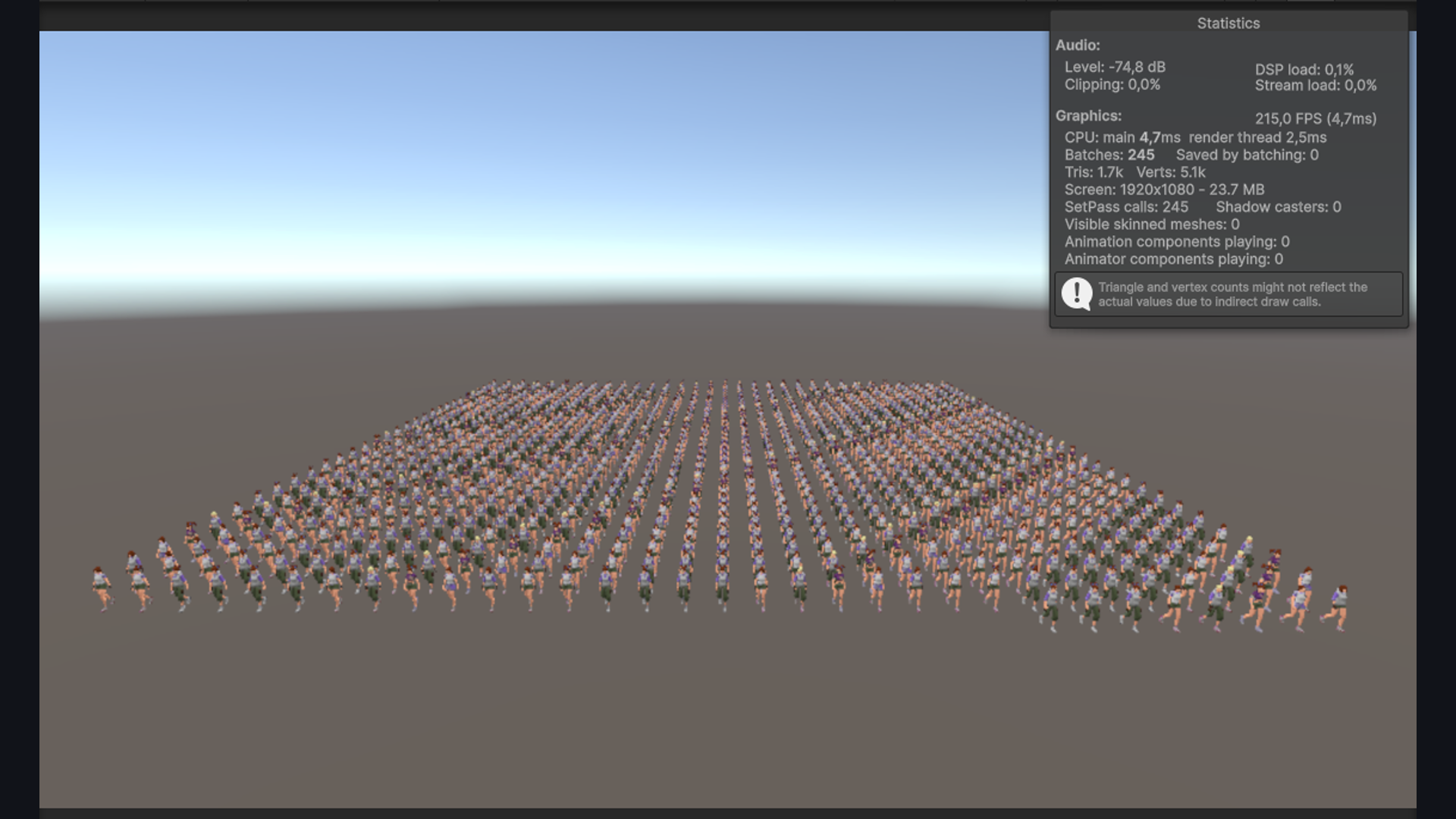
10 → 200 fps, measured on device
NPC crowd animated with Animators The same crowd rendered on the GPU with Vertex Texture Animation
Same scene: Animators (top) vs. GPU skinning with VAT (bottom). Click to enlarge.
Problem
A geolocation game set in a living city needs crowds of NPCs, each wearing clothes from the same dressing system as the player. That meant one Animator per character and a draw call for every garment piece and the body: on a mid-range Android phone, that budget disappears fast.
Approach
Move NPC animation and rendering onto the GPU with Vertex Texture Animation (VAT), and group draws by what the GPU cares about, the mesh being drawn, not the character that owns it.
How it works
A custom VAT baker bakes animation clips into textures at edit time, so skinning happens in the shader. The same garment on different NPCs batches together, and the per-frame update runs off the main thread as a Burst-compiled job.
  • GPU skinning
  • Vertex Texture Animation
  • Jobs System
  • Burst Compiler
  • HLSL
03-snackdown-netcode.md
Snackdown · Multiplayer · Open source

Making a multiplayer platformer the server can trust

Client prediction + server reconciliation, written by hand
By handprediction and reconciliation: Netcode for GameObjects doesn't include them
30 Hzfixed network tick, separate from the framerate
2corrections in 79 s on a home network (2% loss, 367 ms RTT)
4players, host over Unity Relay
Two players online, with the netcode debug panel on. Numbers measured with the Netcode for GameObjects network simulator.
Problem
My final project for a university networking course worked, but clients wrote their own positions, sent RPCs every frame and joined without any approval. Any client could move anywhere, at any speed.
Approach
Rebuild it from scratch as server-authoritative, and build the client-side prediction and server reconciliation myself on top of Netcode for GameObjects' tick system, because Unity doesn't ship them.
How it works
A kinematic controller with one pure step function runs on both client and server, so the client predicts and the server confirms. Input goes out unreliable with the last 3 commands for redundancy; the server sends one snapshot per tick for every player, and remote players are interpolated about 100 ms behind.

Also

Connection approval with a payload (nickname, character, version check), and the same join flow by Relay code or LAN IP behind one interface. EditMode tests cover the simulation, including replay determinism: 40 simulated ticks run twice give a bit-identical result. Built with Claude Code.

  • Netcode for GameObjects
  • Unity Transport
  • Relay / Lobby
  • Client-side prediction
  • Server reconciliation
  • Snapshot interpolation
  • EditMode tests
See the repo on GitHub
04-rollgeon-mobile-port.md
Rollgeon · Mobile port · In development

Taking a browser roguelike to phones and controllers

Mobile port + controller support
Rollgeon reveal trailer, by 3AM Games.
Problem
Rollgeon, a roguelike dice builder started by members of 3AM Games, was built to be played with keyboard and mouse in the browser. Many players, and many studios, want games like this on their phones.
Approach
Rework how the game is played rather than just recompiling it: every interaction has to make sense with a thumb on a phone, and with a gamepad.
How it works
Touch controls replace mouse and keyboard, with inputs reworked into gestures or on-screen buttons depending on the action. The UI adapts to each phone's safe area, so nothing ends up under a notch or a rounded corner. Controller support covers the whole game. It's still in development, and I keep contributing to it.
  • Mobile port
  • Touch controls
  • Gestures
  • Safe area
  • Controller support
Rollgeon on itch.io
05-internal-tooling.md
SOLAR · Automation

Internal tooling for the work nobody should do by hand

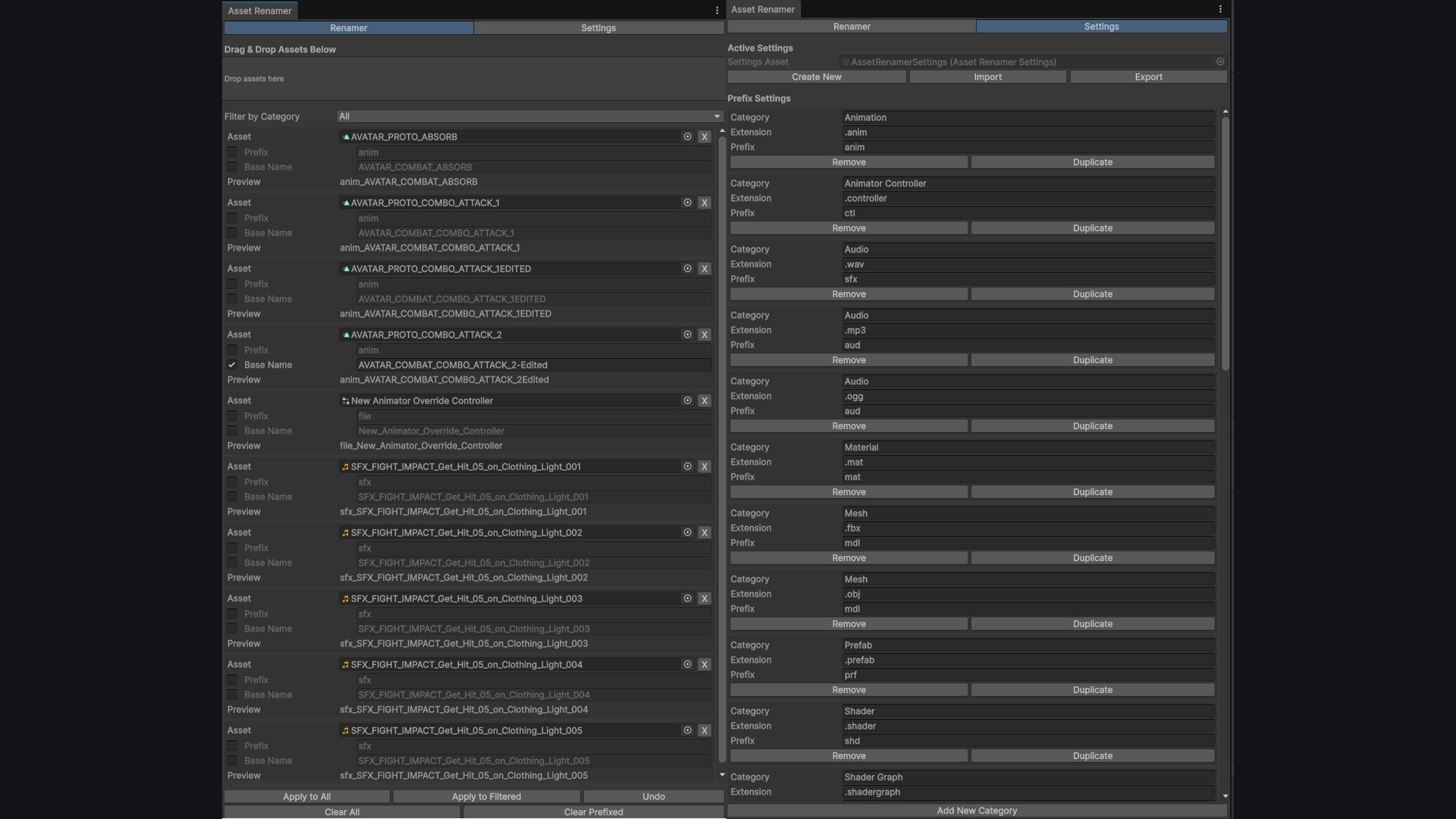
9 of the project's 35 editor tools
Asset Renamer settings window with the shared naming rules
Asset Renamer: one naming convention the whole team shares. Click to enlarge.
Problem
A live mobile game accumulates chores: Addressable groups in sync with folders, regenerating the API client when the backend changes, clearing QA state, cutting builds with the right keystore and version. Each one done by hand is a chance to break a build.
Approach
Build the tools where the chores were, as named editor utilities the whole team could use, not scripts living on my machine.
How it works
An Addressables Folder Manager drives group membership from the folder layout. A build-and-API suite regenerates the typed client safely, cleans QA state, and handles keystore validation and version injection. A Mesh Instance Baker speeds up scene authoring.
  • Custom Editor Tooling
  • Addressables
  • Code generation
  • Build automation
06-camera-contexts.md
SOLAR · Architecture

When everything wants to control the camera

Enforced by the compiler
Problem
Open world, cutscenes, battles, dressing screens, geolocation views: every feature eventually wants the camera. Once several can grab it, it ends up somewhere nobody intended, and no single piece of code is wrong on its own.
Approach
Make camera state single-authority: features declare the context they want, and one arbiter decides, once per frame, in one place.
How it works
Gameplay code never touches a camera; it requests a context. The system lives in an assembly that deliberately doesn't reference Cinemachine, so reaching through the abstraction isn't a code-review conversation: it's a compile error.
  • Assembly Definitions
  • State arbitration
  • Cinemachine
  • Layered architecture
07-level-building-tools.md
Waxy: The Wick and the Witch · Tooling

The repetitive work that was eating level production

10 of the project's 14 editor tools
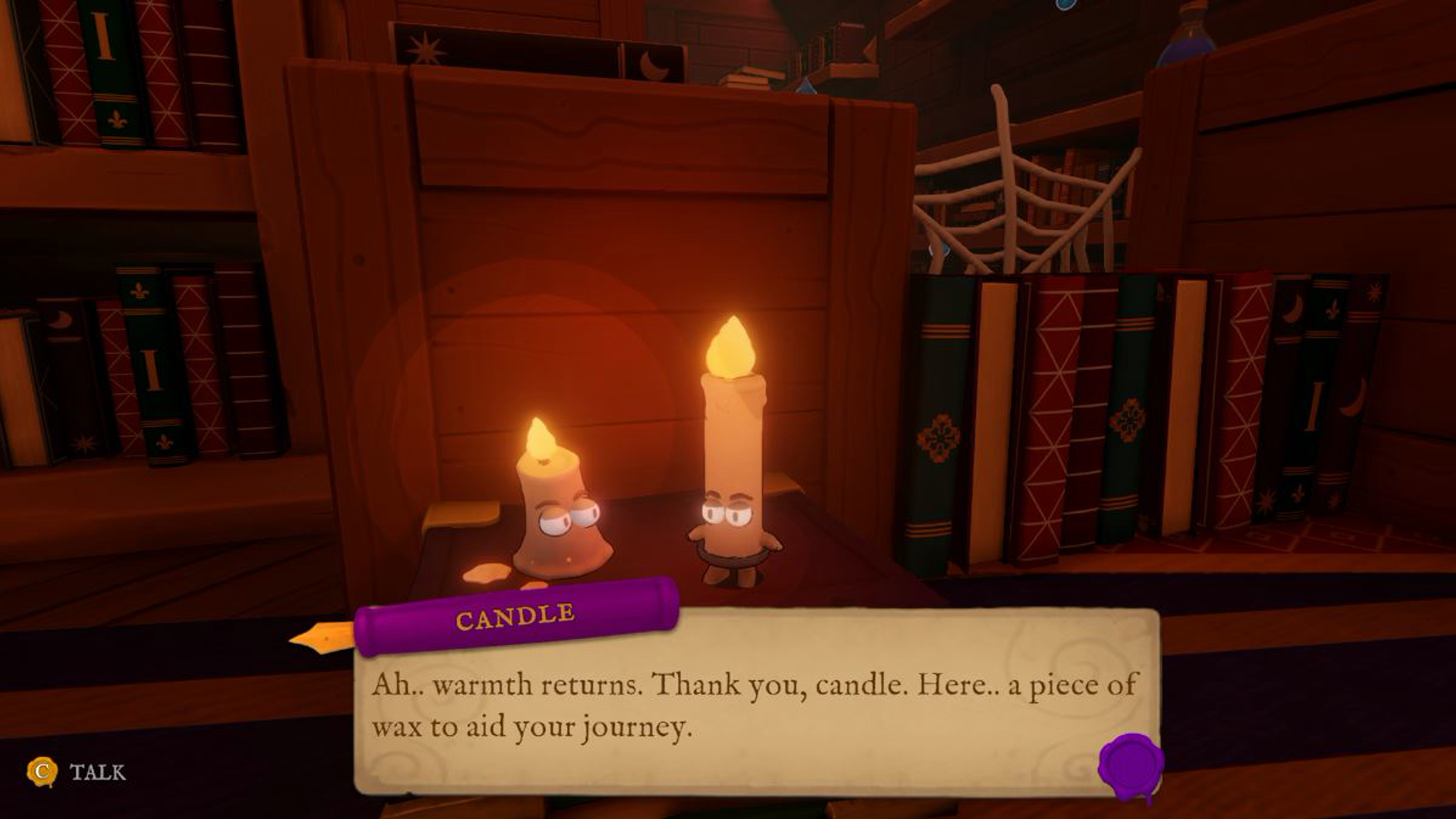
Waxy: The Wick and the Witch, in game
Waxy: The Wick and the Witch, in game.
Problem
Building levels meant converting grey ProBuilder blockouts into prefabs one by one, chasing duplicated materials, and typing localization keys clip by clip into Timelines. Overhead on top of design work.
Approach
Attack each bottleneck where it lived, rather than one big editor: 10 tools, each aimed at a specific piece of manual work, plus a data-driven tuning layer on ScriptableObjects.

How it works

Replace ProBuilder For Prefab converts blockouts into final prefabs in batch. The Subtitle Localization Helper walks every Timeline and writes the localization key back into each subtitle clip.

  • Custom Editor Windows
  • ScriptableObjects
  • Unity Localization
08-external-tooling.md
Personal prototype · External tooling

Building the tool where the problem actually is

Working prototype
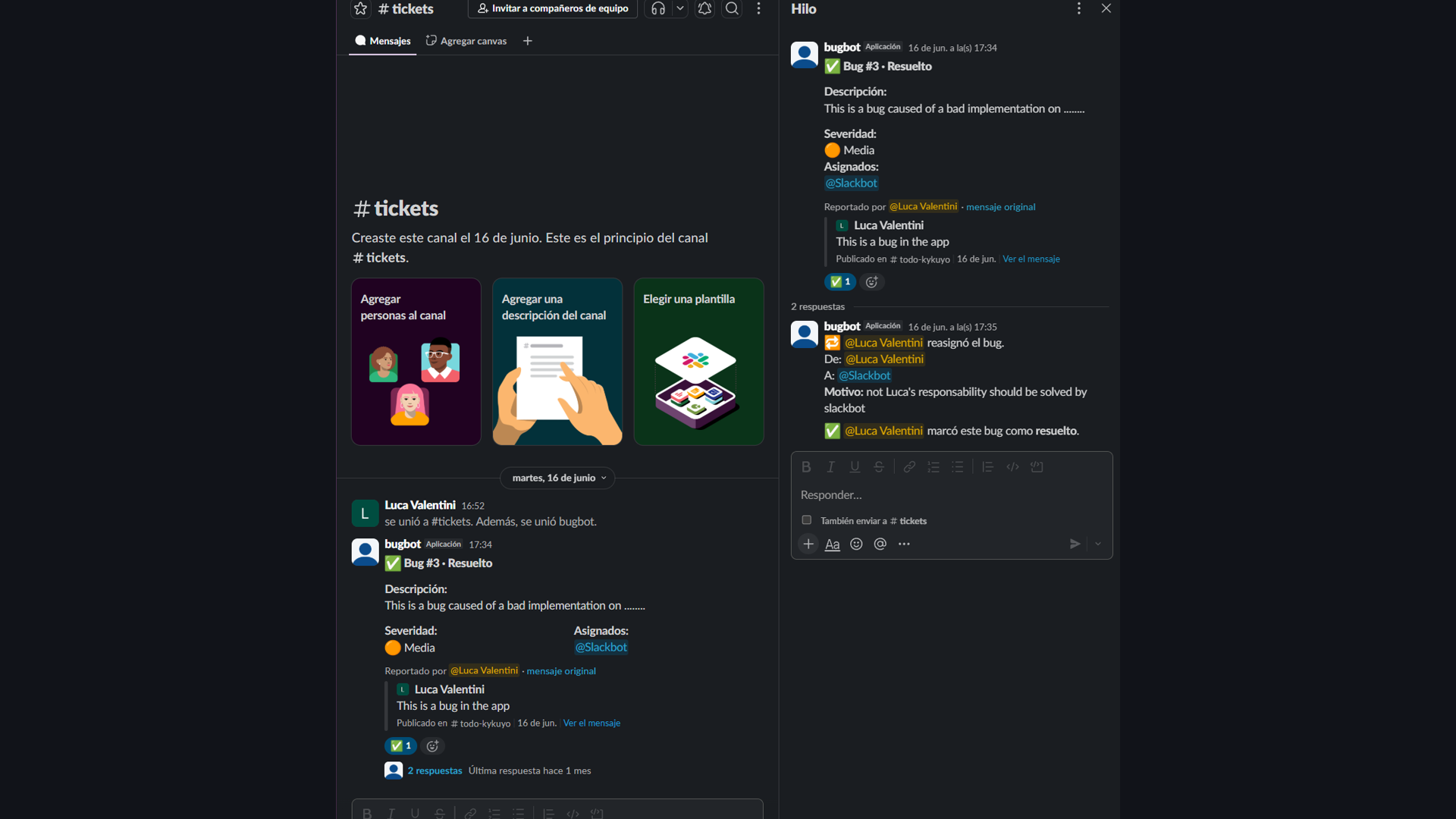
Slack bug-ticket bot
Slack ticket bot, backed by Google Sheets. Click to enlarge.
Problem
Filing a bug meant leaving the conversation, opening a tracker and re-typing the context, so small issues quietly went unreported.
Approach
If the friction is in Slack, the tool belongs in Slack: a bot that turns a message into a tracked ticket, with a spreadsheet as a lightweight backend.
How it works
A slash command opens a modal (assignee, description, severity), the bot posts the ticket to a channel with a thread for follow-up, and a reassign flow records who moved it and why.
  • Slack API
  • Google Sheets API
  • Modals & slash commands
  • JSON tooling